
Summary
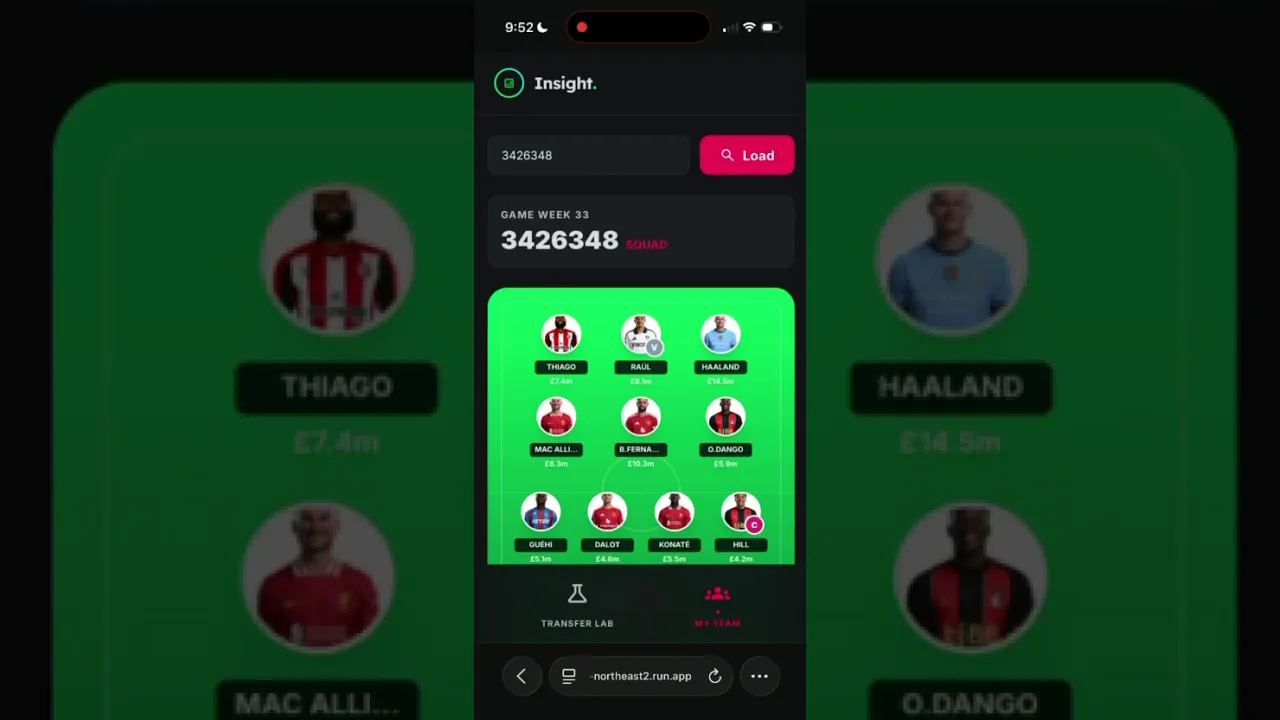
I built and shipped this project using Google's Antigravity AI code editor connected with Google's Stitch for design with Stitch's MCP. The result is a live, full-stack Fantasy Premier League (FPL) Analytics Dashboard that processes live data to show insight and transfer recommendations.
Here is the story of how I shipped it:
What did I develop?
FPL app had some raw data
The original fantasy app has raw data which takes time to review all of them and came to a conclusion on which player to transfer-in, put on bench or select for captaincy.
I came up with algorithms
Went around and asked couple of players I knew and looked how they actually look at those data and what are they missing in their synthesis and/or which insight would come handy for them when running short on time.
Automated the data analysis job
Came up with couple of Algorithms to pick high performing players and suggest transfers.
Tech Stack
My workflow here is result of trying to use the AI tools available to automate as much as I can. I managed to deploy this project live in 2 months total. My AI tool stack looks like this:

Google's Stitch
AI Design tool
MCP
Connected through

Google's Antigravity
Coding agent

Claude Code
Coding agent


Front-end
I skipped the heavy JS frameworks and built the UI using HTML, vanilla JavaScript, and Tailwind CSS.


Backend
I used Python and FastAPI to process massive FPL JSON datasets natively. To ensure my algorithm math was not going sideways, I automated Pytest functions to catch anomalies and edge cases before they go live.


CI/CD Pipeline
I configured GitHub Actions to automatically test and validate my code on every push. Once cleared, it triggers Docker to securely package the entire full-stack application into a single, deployable container.

Hosting
I deployed the packaged container to Google Cloud Run, ensuring the application is publicly accessible with reliable.
The Takeaway
Learned a Ton doing this.
In a world where building products are getting more & more accessible with the help of AI, It's critical to have a grasp of Software engineering to be able to use these tools effectively and efficiently. That's what I tried to do here and Learned a ton of best practices while doing this. I believe no matter your role, Product Building is a great addition to one's skillset.